
Genius Fax
The Grizzly LabsBusiness
4.9663.00 Reviews
- Version
- 1.12.0
- Installs
- 100.00K
- Age Rating
- Everyone
Screenshots
Our Review of Genius Fax
 Analysis by Appyee
For someone who only needs to fax now and then, the most useful question is not whether a phone can replace a bulky machine in every situation, but whether it can make a one-off task less stressful. I find Genius Fax most compelling in that narrow, practical role: it brings sending and receiving into a mobile workflow, while still asking you to think about document quality, the recipient’s number, and the cost of occasional use.
When a phone is a better fit than a fax machine
A realistic example is a form that needs to be sent before the end of the day, while you are away from a printer or office. A phone-based workflow can spare you the trip to find a physical fax machine: prepare the document on your device, enter the destination, and handle the transmission from where you are. That convenience matters most for occasional paperwork, rather than for a workplace that processes faxes all day.
The app is a business tool from The Grizzly Labs, and its practical appeal is easy to understand: the phone you already carry becomes the place to prepare and manage a fax. It is free to install, with in-app purchases ranging from $0.99 to $21.51 per item. That distinction is worth keeping in mind: free to get does not mean every faxing task is free, so I would check the purchase options before relying on it for repeated or lengthy use.
For a single outgoing document, pay-as-you-go can be easier to justify than paying for a dedicated fax line or maintaining a machine. For regular incoming correspondence, the calculation changes: receiving requires subscribing to a fax number, so the ongoing need for that number matters more than the convenience of getting started. I would decide based on the direction and frequency of my faxing, not just on how quickly the app can be installed.
Readability and navigation in a time-sensitive task
The original appeal of a mobile fax app is that it makes a specialized task feel less intimidating. In my experience, a straightforward interface is especially valuable when I am trying to send a document quickly and do not want to learn a machine’s controls. Still, familiar navigation is not the same as a guarantee that every screen will suit every person; people who rely on particular text sizes, contrast settings, or assistive tools should check the app on their own device before a deadline depends on it.
One useful habit is to prepare the document before opening the sending flow. If the file is already saved on the phone, or the paper is ready to photograph, there is less chance of rushing through recipient details while also searching for the right attachment. I would review the recipient’s fax number and the document pages before sending, since an easy interface cannot correct a mistyped number or an incomplete scan.
That small pause is also a readability safeguard. A form can look clear on a phone but still contain faint text, cramped writing, or a page edge cut off in the image. Before transmitting something important, enlarge the document on screen and inspect the details that matter, such as names, dates, signatures, and reference numbers. If the page is hard to read on the phone, it is unlikely to become clearer at the other end.
Motor and sensory considerations
Replacing a physical machine with a phone can reduce some awkward steps, such as handling paper at a fax feeder, but it does not remove all physical demands. Taking a steady picture, framing a full page, typing a long fax number, and selecting the right file can all require careful touch input. If those tasks are difficult, importing a document that is already saved on the device may be less fiddly than photographing loose paper.
Photography also brings a trade-off: it is convenient when no digital copy exists, but the result depends on how the page is positioned and lit. I would place the paper flat, check that every edge is visible, and inspect the captured image before moving on. That is a practical way to catch a tilted page or shadow before it becomes a failed or unreadable transmission.
For sensory comfort, the app’s simple purpose may be less demanding than learning a full office machine, yet the broader task can still involve small text, screen glare, and the pressure of completing paperwork promptly. I would not assume a particular accessibility feature is available without checking it directly. Someone who depends on a specific screen reader interaction or highly customized display should test the relevant screens with a non-urgent document first.
Choosing between mobile faxing and familiar alternatives
Compared with a traditional fax machine, a phone app is easier to carry and can avoid a trip to a shared office or shop. A physical machine may still be better when a business already has one, when staff need a routine high-volume workflow, or when handling paper on a large screen and feeder is more comfortable. The app’s advantage is mobility, not a promise that every office process should move to a phone.
Email is often simpler when the recipient accepts an attachment, and a secure document portal may be the better choice when an organization provides one. Fax remains useful when the receiving party specifically asks for it or when their process is built around fax numbers. I would use Genius Fax to meet that requirement, rather than treating fax as the default for documents that can be sent more directly by another accepted method.
A further trade-off is that a fax number is needed to receive documents, while sending starts with preparing a file and entering the destination. That makes the app a more natural fit for someone who occasionally sends paperwork than for someone who expects a permanent, heavily used business line without considering the subscription. Before choosing it for a team, I would compare the expected frequency of incoming and outgoing faxes and the cost of alternatives already available at work.
Situational access and remaining barriers
Mobile access is helpful when the user is traveling, working away from a desk, or handling a form outside normal office hours. It can also help someone who does not own a fax machine but occasionally encounters a fax-only process. The key is to prepare before the urgent moment: make sure the document is accessible on the phone, understand how the receiving number is arranged if incoming faxes matter, and allow time to check the finished transmission.
There are limits to that convenience. A phone may not be the right place to handle a long packet, review fine print, or correct a document that needs substantial editing. Network conditions, a poor photograph, a wrong destination number, or a recipient-side problem can also interrupt the task. Tracking fax status is useful feedback, but I would still keep the original file and avoid assuming that starting a transmission means the intended person has read it.
For sensitive paperwork, the original article describes document encryption, which is reassuring, but I would still use care with the whole process: choose the correct recipient, avoid sending from a screen where someone else can see private details, and verify that the destination is appropriate. A security feature does not prevent a human mistake such as sending a medical form to the wrong fax number.
The app is rated for Everyone and has an average rating of 4.8 from around three thousand ratings, with over one hundred thousand installs. Those figures suggest that it is a familiar option for people seeking mobile faxing, but they do not answer the personal question of whether its workflow suits your eyesight, dexterity, or frequency of use. I would treat a low-stakes first fax as a useful test of both usability and document quality.
Its current version is 1.10.0 and it requires Android 8.0 or later. It was released on June 25, 2014, so it has been available for years, but compatibility still depends on the device and operating system in front of you. The best practical check is to confirm it installs and that the screens you need work comfortably before you depend on it for a deadline.
Ever found yourself needing to send a fax but felt like you’d stepped back into the 1990s? I’ve been there. Thankfully, there’s Genius Fax, an app that promises to drag faxing into the modern age. Let’s dive in and see if it lives up to its name.
Getting Started with Genius Fax
First things first, downloading Genius Fax is a breeze. Available for both Android and iOS, you can find it easily on the App Store or Google Play. Once installed, the setup is straightforward. No need to dust off your old fax machine manual here!
Upon opening the app, you’re greeted with a clean, user-friendly interface that’s pretty intuitive. Whether you’re tech-savvy or a bit of a technophobe, you’ll find your way around quickly.
Sending Your First Fax
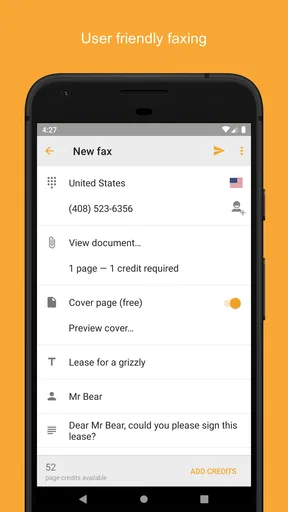
Sending a fax with Genius Fax is almost too easy. Just snap a photo of the document you need to send or import it directly from your phone. The app supports a variety of file formats, so whether it’s a PDF, JPEG, or even a DOC file, you’re covered.
Once your document is ready, enter the recipient’s fax number, and you’re good to go. You can even choose from a selection of cover page templates to add a professional touch. It’s like sending an email but with a retro vibe!
Receiving Faxes
Receiving faxes is just as simple. By subscribing to a fax number through the app, you can have faxes sent directly to your device. It’s a seamless process that ensures you never miss an important document, no matter where you are.
Pricing and Extras
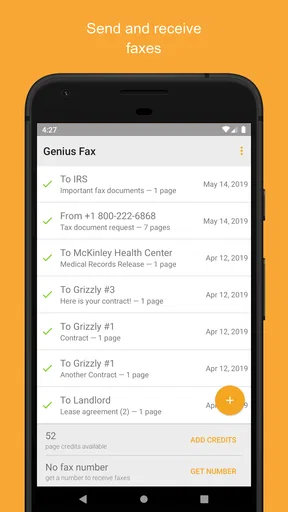
Genius Fax operates on a pay-as-you-go model. You purchase credits within the app, which can be used to send and receive faxes. It’s a flexible system that means you only pay for what you use, which is great if you’re not a frequent faxer.
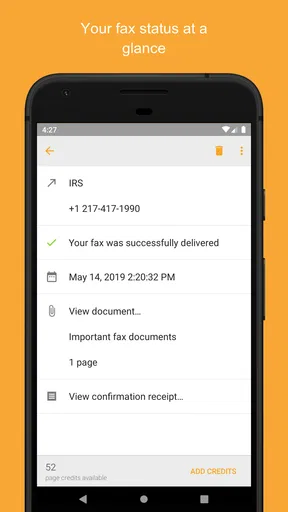
If you’re worried about security, Genius Fax has you covered. The app encrypts all documents, ensuring your sensitive information stays private. Plus, you can track the status of your faxes, so you always know if your document reached its destination.
Final Thoughts
So, is Genius Fax worth downloading? In my opinion, absolutely. It’s an easy, efficient, and secure way to handle faxing without the hassle of traditional machines. Whether you’re sending a one-off document or regularly need to fax things, this app makes the process painless.
With its straightforward interface, flexible pricing, and strong security features, Genius Fax is a must-have for anyone who needs to send or receive faxes in today’s digital world. Give it a try, and you might just find yourself actually enjoying the process of faxing.
My recommendation is strongest for occasional, clearly defined jobs: sending a signed form, forwarding a few pages, or receiving a document while away from an office. I would skip it if faxing is a daily core business process, if you need a shared team workflow, or if a recipient accepts email or a portal and you do not need fax at all. For those situations, a dedicated office setup or the recipient’s preferred digital channel is likely more convenient.
An inclusive verdict based on the task, not the promise
What I appreciate most is the chance to handle a fax without hunting down a machine, while the main caution is that mobile convenience does not automatically make document handling effortless for everyone. The best results come from preparing files in advance, checking each page and number, and choosing the app only when fax is genuinely required. If that matches your situation, it is a practical option; if your access needs or work volume make phone-based handling uncomfortable, another route is sensible.
Verdict
Strengths of Genius Fax
- Easy-to-use interface for quick faxing.
- Supports multiple file formats for upload.
- Integration with cloud storage services.
- Secure transmission with encryption features.
- No need for a dedicated fax machine.
Limitations of Genius Fax
- Limited free trial; requires subscription.
- Occasional delays in fax delivery.
- No option for receiving faxes, only sending.
- Requires stable internet connection.
- Customer support response time can vary.
Other Releases by The Grizzly Labs
View All
Genius Scan - PDF Scanner
Business4.9
Similar Picks in This Category
View All
LinkedIn: Community & Network
LinkedIn3.8

Zoom Workplace
zoom.com4.1

Microsoft Teams
Microsoft Corporation4.6

Meta Business Suite
Meta Platforms, Inc.4.6

Webex Meetings
Cisco Systems, Inc.4.5

TeamViewer Remote Control
TeamViewer4.4
Frequently Asked Questions
What is Genius Fax, and how does it work?
Genius Fax is a mobile application designed for sending and receiving faxes directly from your smartphone or tablet. It allows users to take photos of documents or import files from cloud services, which can then be sent as faxes. The app also provides a dedicated fax number for receiving faxes, making it a convenient solution for mobile fax needs.
How much does it cost to use Genius Fax?
Genius Fax operates on a pay-as-you-go model, which means you purchase credits to send faxes. The cost per page depends on the destination and the number of pages. Additionally, there may be a subscription fee for maintaining a dedicated fax number to receive faxes. Pricing details are available in the app’s purchase options.
Is Genius Fax secure for sending sensitive documents?
Yes, Genius Fax is designed with security in mind. The app uses encryption to protect your documents during transmission. However, it’s always advisable to check if the app meets your specific security requirements, especially if you are handling highly sensitive information. Users should also ensure their device is secure.
Can I use Genius Fax without an internet connection?
No, Genius Fax requires an active internet connection to send and receive faxes. The app uses your device’s internet connection to transmit faxes to the recipient. Therefore, a stable Wi-Fi or cellular data connection is essential for using the app’s full functionalities.
What file formats does Genius Fax support for sending documents?
Genius Fax supports a variety of file formats, including PDF, DOC, and JPG, among others. Users can upload files directly from their device or import them from cloud storage services like Google Drive or Dropbox. This flexibility ensures that most standard document types can be easily converted into faxes.
